Getting Started in Brave New Wonders
First-hour walkthrough for the 1.0 Steam release — from landing on the Americas islands to a stable automaton loop.
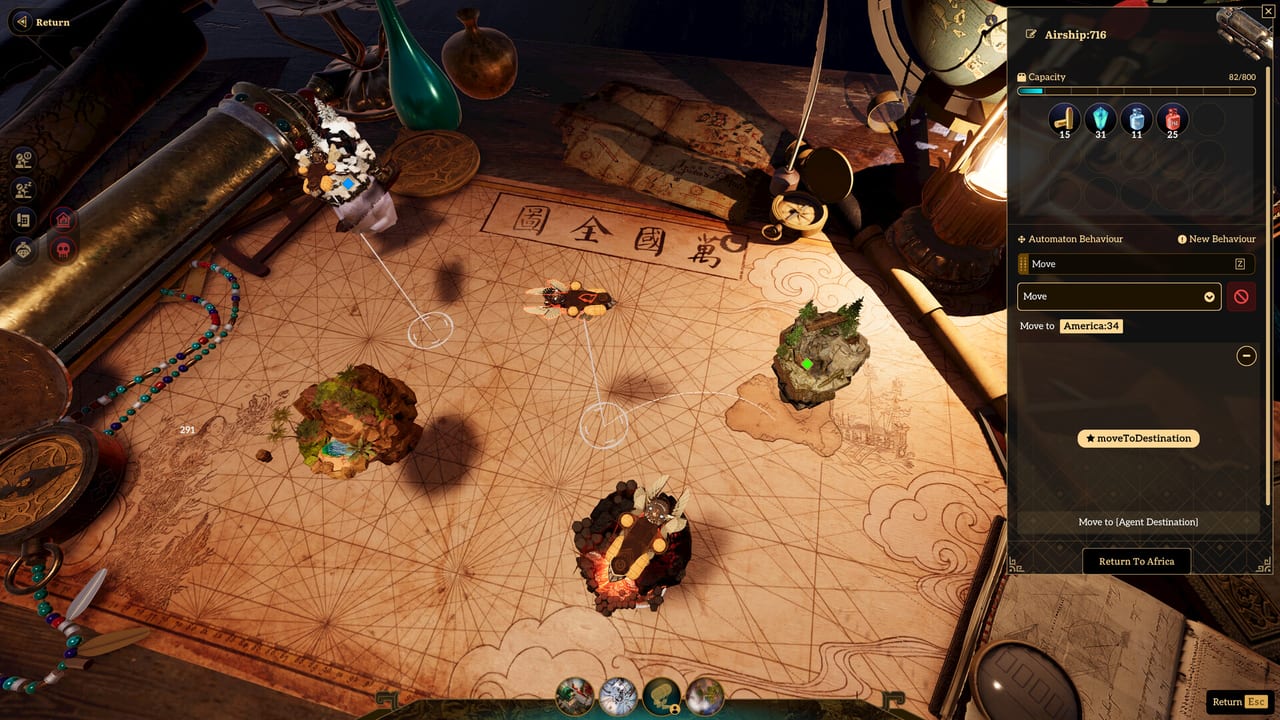
Brave New Wonders is a single-player factory automation and base-building game by City From Naught Inc., published with LoongGate. Version 1.0 launched on Steam (app 2403830) around September 20/21 2026. The pitch is simple and radical: there are no conveyor belts. Worker robots called automatons move every resource by following plain-text commands you write in any language. This getting-started guide gets you through the opening Americas biome with a clean loop you can scale.
If you came from a demo or playtest, your save may carry over. The developers still recommend a fresh start for the best 1.0 experience. Use this page either way: as a first-boot checklist or as an audit of brittle early behaviours.
Before you launch
Confirm your machine can run the Unity 6 Windows build. Minimum specs land around Windows 10 64-bit, i5-6400, 16 GB RAM, GTX 1650, DirectX 11, and roughly 27 GB on SSD. Recommended sits closer to i7-7700, 32 GB RAM, RTX 2080, DirectX 12, and about 30 GB. For a fuller checklist, see the Players Hub. Official UI languages are English and Simplified Chinese only — community wiki pages may still help in other languages, but in-game menus match that pair.
Launch pricing has been about $24.99 with a short launch discount window; always verify the live Steam store page. Art is handcrafted (no generative AI for assets). Only the command parser uses AI — that distinction matters when you decide how much to trust freeform text versus hand-edited graphs.
The opening fantasy: floating Americas
You begin among floating islands held aloft by Levitanium, starting in the Americas biome of a wider archipelago that later includes Europe, Asia, and Africa. Treat the first island as a teaching factory, not a forever megabase. Early goals should stabilize:
- Ore and basic refining
- Crystal gathering
- Sand processed toward glass
- Water access
- Early power and fusion cells as they unlock
- A reliable Miner and Mover pair
Resist the urge to sprawl every free plot. Leave room for signal lines, turret arcs, and a future blueprint footprint you can paste after you unlock cloning patterns. The Islands guide covers biome travel later; for now, own your starting rock.
Automatons instead of belts
Two early types matter most:
- Miner — digs and extracts; the mining automaton silhouette is inspired by the Loong motif tied to the publishing partnership.
- Mover — carries items between nodes based on the instructions you give.
You do not draw belts. You open the behaviour editor, type what you want in plain language (or start from a preset behaviour), and let the game parse your text into a behaviour graph. You can also build or tweak that graph manually when the parse is close but not perfect. Colored signals between buildings coordinate timing without spaghetti.
Read the dedicated Text Commands guide as soon as your first freeform instruction feels magical or confusing. Until then, use presets for mining and hauling, then customize one instruction at a time.
First-hour checklist
- Complete the onboarding prompts without skipping tooltips about the behaviour editor.
- Place a starter mining loop on a clear ore node; assign a Miner with a preset dig behaviour.
- Assign a Mover to carry output to storage or the next crafting step — keep destinations explicit in the text.
- Add sand and water routes only after ore is stable; glass and later recipes punish half-built chains.
- Drop a simple signal between the miner’s drop-off and the mover’s pickup if they desync.
- Save a blueprint of the working cell as soon as it runs for a few cycles.
- Clone carefully: cloned automatons keep their tasks, which is powerful and dangerous if the task was wrong.
When the loop feels boring in a good way, you are ready for the Automation deep dive — blueprints, signals at scale, and paste discipline.
Combat arrives earlier than you think
Floating islands are not peaceful parks. Old-world machines still haunt the ruins. Learn turret placement, keep dynamite in mind for stubborn chokepoints, and watch for weapon relics that change how you hold a perimeter. You do not need a fortress on minute ten, but you do need a plan before your only Miner walks into a patrol. The Defense guide covers turrets, explosives, and relic usage in depth.
A practical early rule: never expand a resource finger farther than your current turret coverage plus one automaton retreat path.
Mid-term goal: Sky Pillar and the first Wonder
Your narrative and logistical spine points at the Sky Pillar. Unlocking it leads to the first Wonder: a massive airship that can carry factories between islands. That is the moment Brave New Wonders stops being “one island factory game” and becomes an archipelago logistics game. Do not rush it with a broken home loop. Stabilize Americas production, learn commands, then push the Pillar path with the Wonders guide open.
Habits that pay off for the whole campaign
- Name behaviours clearly so clones remain understandable a week later.
- Prefer short, testable commands over novel-length paragraphs the parser might mis-slice.
- After every successful experiment, blueprint the layout before you “just tweak one more thing.”
- Keep a scrap island corner for combat tests so a bad dynamite idea does not flatten your glass line.
- Check the Tier List Hub when you start ranking which presets and combat tools deserve early investment.
- Watch Updates after major patches so command quirks and balance shifts do not invalidate your notes.
- Bookmark official pointers on the Links Hub (including bravenewwonders.com and the Steam page).
Common early mistakes
Writing vague destinations. “Take ore somewhere useful” fails; “carry ore from Miner A drop-off to Furnace Input B” succeeds.
Scaling before signals. Doubling Movers without coordination creates traffic jams the belt games never prepared you for.
Ignoring combat LOS. A perfect glass chain still dies if an old-world machine path cuts through it.
Hoarding demo habits. Old saves may work, but messy tutorial behaviours multiply when cloned. Rebuild the first cell cleanly.
Forgetting the airship endgame. If your Americas base cannot be modularized, the Wonder will feel like a punishment instead of a reward.
What to read next
- Text Commands — parse quality, presets vs custom text, graph editing
- Automation — loops, blueprints, cloning discipline
- Defense — turrets, dynamite, relics
- Wonders — Sky Pillar and airship logistics
- Islands — Europe, Asia, Africa biomes after you can travel
Finish this getting-started loop with one ore-to-storage circuit you trust, one blueprint of it, and one turret covering the approach. That is a real Brave New Wonders foundation — not a belt bus, but a language you can scale across the sky.
Frequently Asked Questions
Quick answers to the most common Pioneer questions.
Is Brave New Wonders out now on Steam?
Yes. The 1.0 release landed around September 20/21 2026 on Steam (app 2403830) as a single-player Windows game. Confirm live store pricing and discounts before purchase.
Do I need conveyor belts to start?
No. There are no conveyor belts. Use Miner and Mover automatons with preset or custom plain-text behaviours, then refine the behaviour graph as needed.
Should I continue a demo or playtest save?
Saves can carry over, but the developers recommend a fresh start for the best 1.0 experience. If you keep an old save, rebuild early behaviours before cloning them.
What should I unlock first after a stable factory?
Push toward the Sky Pillar so you can unlock the first Wonder — the airship that carries factories between islands — once your Americas loop is modular and defended.
Which automaton types matter on day one?
Focus on Miner for extraction and Mover for hauling. Learn presets first, then customize text commands and signals before expanding the roster.
What languages does the official UI support?
Official UI languages are English and Simplified Chinese. You can still write automaton commands in any language the parser accepts.